How Ennodia works
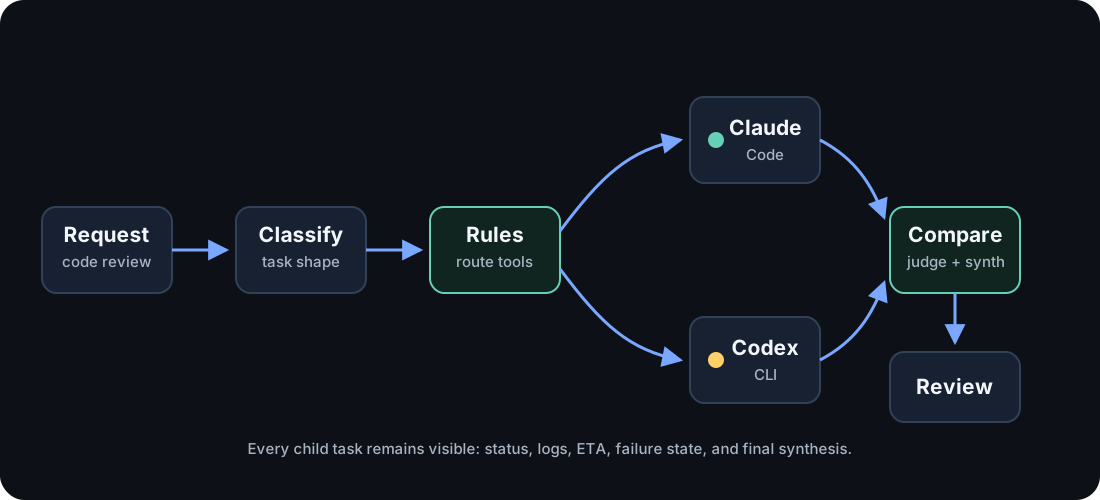
When an MCP client submits a high-level run, Ennodia processes it through a visible orchestration pipeline. The ennodia_run tool is the current end-to-end entrypoint; the lower-level task and Compare tools stay available for direct debugging.
1. Discover
Section titled “1. Discover”Ennodia maintains a registry of connected execution backends. The current adapters cover Claude Code, Codex CLI, OpenCode, and Antigravity; additional adapters can be added behind the same thin interface.
2. Plan
Section titled “2. Plan”The router combines the task classification with user-defined rules and the currently available backends.
For example:
3. Execute
Section titled “3. Execute”Each node in the graph is dispatched through a thin adapter.
4. Watch
Section titled “4. Watch”Every model call, agent, subagent, tool invocation, and shell process becomes a tracked child task.
5. Recover
Section titled “5. Recover”Failure handling is part of the execution plan.
Nodes can time out, retry, fall back to another backend, or return partial results without hiding what happened.
6. Compare
Section titled “6. Compare”When several agents produce answers, Ennodia does not simply concatenate them. A judge may produce a structured comparison. A synthesizer then uses that comparison and the original outputs to create the final result.
7. Return
Section titled “7. Return”The MCP client receives the final output, while Ennodia retains the complete execution record.